Enabling Direct Export
EndNote's Direct Export feature allows certain file types to be associated with the EndNote application. When a direct export file is sent from a browser to EndNote, EndNote can recognize the filter that should be used to import the references, and import them automatically. In the macOS, this process works best in Firefox because you don't need to double-click on the file to open it in EndNote.
Note: Changing settings to enable Direct Export will only work consistently with file types that were designed for Direct Export. Changing settings for other file types, such as .txt files, can cause problems and is strongly discouraged.
Setting Firefox to Open Direct Export Files in EndNote
Firefox allows you to set the option to send files to EndNote within the program. If Firefox is set to ask whether to open or save files, the first time it downloads a file with a file type it does not recognize, it will show a window similar to the one below, asking what to do with the file. Choose the option to Open with EndNote and mark the box to Do this automatically for files like this from now on. In the future, Firefox should send files with this extension directly to EndNote.
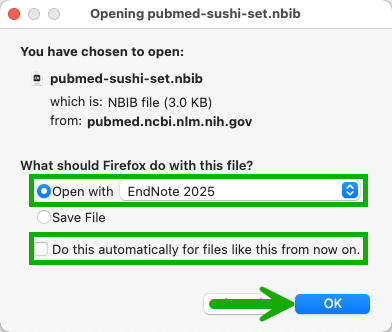
If, in the past, Firefox was instructed to save this file type instead of sending it to EndNote, you may be able to change that in the settings.
- In Firefox, navigate to Settings > General > Applications.
- Locate the Direct Export file type by the extension shown in the left column.
- In the right column for the extension, select Use other… and select the EndNote application.
- Close the Firefox settings to save your change.
If Firefox does not ask if new file types should be saved or opened with an application, you can set Firefox to ask for instructions for new file types.
- In Firefox, navigate to Settings > General > Applications > What should Firefox do with other Files?
- Select the option Ask whether to open or save files.
- Close the Firefox settings to save your changes.
Note: These instructions worked at the time of this writing, but browsers change over time. You may need to adapt these instructions to your present version of Firefox.
File Extensions Associated with Direct Export
At the time of the EndNote 2025 release, these were the file type extensions EndNote will automatically associate with direct export:
- .CIW
- .ENW
- .RIS
- .NBIB
- .OVD
Note: This list does not mean that only these file types will work with direct export, but that these files can be expected to work reliably with direct export.