Document Compatibility between Word and Word Online
Word documents can be used with EndNote Cite While You Write both on the desktop and online, but a special setting is required on the desktop.
For Documents Created in Word on the Desktop
To ensure new documents created in Word on the desktop will be compatible with Cite While You Write in Word Online:
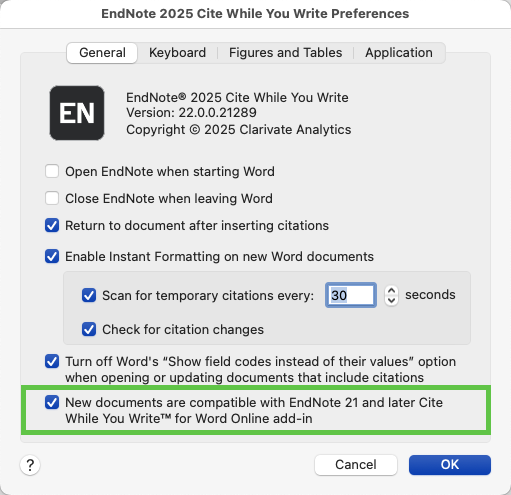
- In Word on the desktop, open the Cite While You Write preferences using the Preferences button, as shown below.

- In the Cite While You Write Preferences dialog, select the option labeled New documents are compatible with EndNote 21 and later Cite While You Write for Word Online add-in. This setting will ensure that EndNote citations in new documents created in Word on the desktop will be compatible with the EndNote citations for Word Online.
For All Other Word Documents
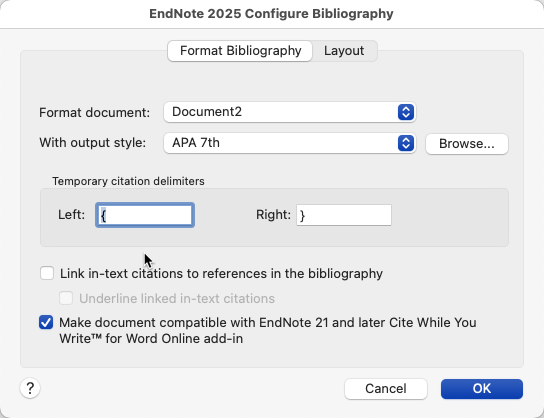
- If you don't know whether or not the original document was set to be compatible with EndNote 21 and later citations for Word Online, configure the bibliography for compatibility by selecting the Configure Bibliography button on the Cite While You Write toolbar, as shown below.

- Then select the option to Make document compatible with EndNote 21 and later Cite While You Write for Word Online add-in.